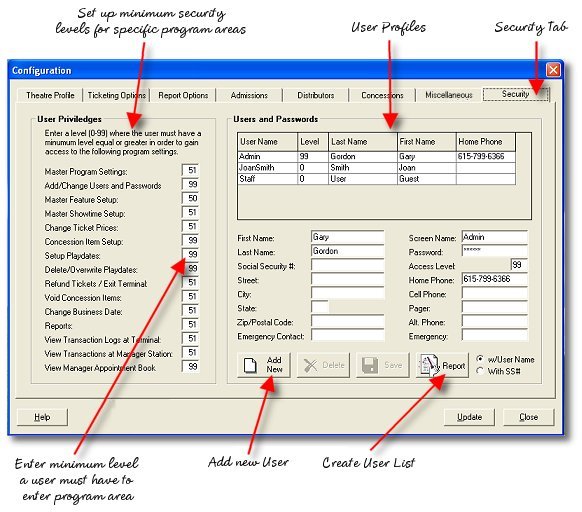
The Security page allows you to set minimum security levels required for access to specific program areas and functions. A number between 0 and 99 may be specified. The user trying to access a feature or function must have a security level at least of that level to be able to use the feature.
Example 3-Level Security Level Setup:
Manager - Level 99
Access to everything, including setting up other user priviledges
Asst. Manager - 50
Access to all reports, voiding and refunding
Employee - 0
Access only to sales screens
Frequently Asked Questions:
What Goes Here? (Fields you may not know what to enter in)
USER PRIVILEDGES:
Master Program Settings - Access to configuration menu minimum security level. Note, areas within the configuration, for instance security level setup, ticket prices, etc. may have a higher level required to enter that specific area than to simply enter the configuration menu as a whole. If accessed, a higher level may be required.
Add/Change Users and Passwords - Level required to access setup for users and passwords
Master Feature Setup - Access to master feature template
Master Showtime Setup - Access to master showtime template
Change Ticket Prices - Access to ticket price configuration, including category names and which profile is selected
Concession Item Setup - Access to changing the concession items, buttons and prices
Setup Playdates - Access to creation and editing of playdate files
Delete or Overwrite Playdates - Access to the capability of deleting and or overwriting playdates. You can actually have users who have access to create playdates and edit them but do not have the authorization to delete or overwrite them. This can print the accidental erasure of a playdate for which tickets have been sold.
Refund Tickets/Exit Terminal - Access level for users who have permission to issue refunds or exit the sales terminal.
Void Concession Items - Access to the capability of voiding items after a sales is completed
Change Business Date - Access to the capability of changing the current business date
Reports - Access to the reports the program can create
View Transaction Log at Terminals - Access to the transaction logs that can be displayed in the terminal.
View Transaction Log at Manager's Station - Access to the transaction logs that can be displayed on the manager's screen by clicking the terminal nickname
View Manager Appointment Book - Access to the manager's appointments